Showing posts with label Java EE or J2EE. Show all posts

Tuesday, April 15, 2008

How to Run a Servlet?

How to Run a Servlet?
To run a servlet one should follow the steps illustrated below:
  • Download and Install the tomcat server: Install the tomcat server in a directory in which you want to install and set the classpath.for the variable JAVA_HOME in the environment variable
  • Set the class for the jar file: Set the classpath of the servlet-api.jar file in the variable CLASSPATH inside the environment variable by using the following steps.For Windows XP,
    Go to Start->Control Panel->System->Advanced->Environment Variables->New button and Set the values asVariable Name: CLASSPATH Variable Value: C:\Program Files\Java\Tomcat 6.0\lib\servlet-api.jarFor Windows 2000 and NT
    Go to Start->Settings->Control Panel->System->Environment Variables->New button and Set the values asVariable Name: CLASSPATH Variable Value: C:\Program Files\Java\Tomcat 6.0\lib\servlet-api.jar
  • Create a java source file and a web.xml file in a directory structure.
  • Compile the java source file, put the compiled file (.class file) in the classes folder of your application and deploy the directory of your application in the webapps folder inside the tomcat directory.
  • Start the tomcat server, open a browser window and type the URL http://localhost:8080/directory (folder name of your application) name/servler name and press enter.
  • If everything is correct your servlet will run.

The Servlet Class Hierarchy

The Servlet Class Hierarchy
The most basic servlet definitions live in the javax.servlet package and consist of a number of interfaces.
  • The ServletContext interface provides a means for servlets to communicate with the surrounding Web server or application server. This communication can take the form of requests for system resources, reports written by the servlet to a log file, and so on. Indirectly, the ServletContext also allows servlets to communicate with one another, primarily by sending requests to other pages. This is how the jsp:forward and jsp:include tags are implemented, as will be seen shortly. ServletContext is implemented by people writing the Web or application server; servlet authors seldom need to use it directly and never need to extend it.
  • The ServletConfig interface provides a mechanism for the web Server to pass initialization information to the servlet's init() method. This information takes the form of pairs of names and values, which are stored in a configuration file called web.xml. If a servlet is going to open a connection to a database, it would not make sense to hard-code the name of the driver class and the database URL in the servlet's code. Doing so would make the servlet more difficult to change if a new database were ever installed. Instead, this information could be sent to the servlet as parameters, and the servlet would use the ServletConfig to retrieve these values and act accordingly. Like ServletContext, this interface is implemented by the authors of the Web server.
  • The Servlet interface defines the three life-cycle methods—init(), service(), and destory()—as well as a handful of others.
  • The ServletRequest and ServletResponse interfaces encapsulate a request to the servlet and a response from the servlet, respectively. Objects that implement these interfaces will be passed to the servlet's service() method. Code within this method can then use the ServletRequest to determine information about the request, such as its origin, the exact data being requested, and so on. Similarly code in the service() method can then use the ServletResponse to return information about the response, as well as the data, such as an HTML page, that comprises the response itself.
  • The javax.servlet package also defines three other classes. Two are the ServletInputStream and ServletOutputStream classes, which servlets use to read and write data, respectively. The third class, GenericServlet, implements both the Servlet and ServletConfig interfaces and forms the basis for most real servlets.

Wednesday, December 19, 2007

What are Java Server Pages?

JavaServer Pages (JSPs)
JavaServer Pages (JSPs) are based on the concept of server-side parsing. A JavaServer Page is an HTML page with Java statements embedded in it. The JSP specification defines certain special tags that can be embedded within the HTML page. In a normal working scenario, the JSP pages are parsed by a JSP compiler within the application server and converted into a Java servlet with the generated code embedded within the Java servlet as a set of Java statements. The generated Java servlet is then compiled as a normal servlet and loaded into the Java servlet container. The Java servlet is then used to process the user requests.


The JSP specification defines the following set of tags that can be used by application component providers:

  • Directive tag— A directive tag embedded in a JSP is used to issue directives to the JSP compiler that compiles the JSP.
  • Declaration tag— A declaration tag can be used by the application component provider to define variables or methods that need to be put outside the service() method of the final generated Java servlet.
  • Expression tag— In order to use Java values or variables directly in the JSP, you can use the expression tag.
  • Scriptlet tag— The scriptlet tag is the most important tag in the JSP specification because it enables the actual embedding of Java code within an HTML page. An application component provider can write entire processing routines within the scriptlet tags.
  • Custom tag— The final set of tags that the JavaServer Page specification defines is the embedding of custom tags. Because the JSP compiler cannot process these tags on its own, a special set of classes called the JSP tag library must be built by the application component provider to support the processing of the custom tags.

Sunday, December 16, 2007

Testing with JUnit

Testing with JUnit

JUnit is an open source testing framework that comes with Eclipse and other IDEs. You can create JUnit-based classes in the same project as other classes, and use this JUnit code to test the other classes in your project. Using JUnit in this way, you can construct a set of standard tests for everyone working on an application, and if they change the application's code, all they'll need is a few clicks to verify that the application still passes the standard set of tests.

JUnit is designed to test your code, and it's made up of assertion methods that can test various conditions. Here they are:

assertEquals(a, b)

Tests if a is equal to b (a and b are either primitive values or must have an equals method for comparison purposes)

assertFalse(a)

Tests if a is false, where a is a Boolean value

assertNotNull(a)

Tests if a is not null, where a is either an object or null

assertNotSame(a, b)

Tests if a and b both do not refer to the identical object

assertNull(a)

Tests if a is null, where a is either an object or null

assertSame(a, b)

Tests if a and b both refer to the identical object

assertTrue(a)

Tests if a is true, where a is a Boolean value

You construct JUnit tests using these methods; when you run a JUnit application, it opens its own view to give you an immediate indication of which tests have passed and which have failed.

Tuesday, December 11, 2007

What is Struts?

What is Struts?
Struts Frame work is the implementation of Model-View-Controller (MVC) design pattern for the JSP. Struts is maintained as a part of Apache Jakarta project and is open source. Struts Framework is suited for the application of any size. Latest version of struts can be downloaded from
http://jakarta.apache.org/. We are using jakarta-struts-1.1 and jakarta-tomcat-5.0.4 for this tutorial.

What is Model-View-Controller (MVC) Architecture?
Model-View-Controller architecture is all about dividing application components into three different categories Model, View and the Controller. Components of the MVC architecture has unique responsibility and each component is independent of the other component. Changes in one component will have no or less impact on other component. Responsibilities of the components are:
Model: Model is responsible for providing the data from the
database and saving the data into the data store. All the business logic are implemented in the Model. Data entered by the user through View are check in the model before saving into the database. Data access, Data validation and the data saving logic are part of Model.
View: View represents the user view of the application and is responsible for taking the input from the user, dispatching the request to the controller and then receiving response from the controller and displaying the result to the user. HTML,
JSPs, Custom Tag Libraries and Resources files are the part of view component.
Controller: Controller is intermediary between Model and View. Controller is responsible for receiving the request from client. Once request is received from client it executes the appropriate business logic from the Model and then produce the output to the user using the View component. ActionServlet, Action, ActionForm and struts-config.
xml are the part of Controller.

Tuesday, November 27, 2007

Rich Internet Applications (RIAs)

Rich Internet Applications (RIAs) are web applications that offer the responsiveness, “rich” features and functionality approaching that of desktop applications. Early Internet applications supported only a basic HTML graphical user interface (GUI). Though they could serve simple functions, these applications did not have the look or feel of a desktop application. The relatively slow Internet connections these applications relied on led to the term “World Wide Wait.” RIAs are a result of today’s more advanced technologies that allow greater responsiveness and advanced GUIs.
Technologies used to develop Rich Client Applications are:

  • Ajax
  • Dojo
  • Flex
  • Silverlight
  • Java FX
  • Ruby on Rails
  • Script.aculo.us
  • JavaServer Faces
  • ASP.NET Ajax
  • Adobe Integrated Runtime and Google Gears

Refer these links for more details on above technologies

“History.” The Dojo Toolkit, 10 April 2007 <http://dojotoolkit.org/book/dojo-book-0-9/introduction/history>.
“Adobe Flex 2.” Adobe <http://www.adobe.com/products/flex/whitepapers/pdfs/flex2wp_technicaloverview.pdf>.
Cubrilovic, N. “Silverlight: The Web Just Got Richer.” TechCrunch, 30 April 2007 <http://www.techcrunch.com/2007/04/30/silverlight-the-web-just-got-richer>.
“Sun Radically Simplifies Content Authoring—Previews JavaFX Script.” Sun Microsystems, 8 May 2007 <http://www.sun.com/aboutsun/pr/2007-05/sunflash.20070508.2.xml>.
“Prototype Tips and Tutorials.” Prototype JavaScript <http://prototypejs.org/learn>.
“Core Effects.” Script.aculo.us Wiki <http://wiki.script.aculo.us/scriptaculous/show/CoreEffects>.
Berlind, D. “Google Gears Vies to be De Facto Tech for Offline Web Apps.” ZDNet, 31 May 2007 <http://blogs.zdnet.com/Berlind/?p=504>.
Mills, E. “Google Gears Churns Toward Microsoft.” CNET, 31 May 2007 <http://news.com.com/2100-1012_3-6187942.html>.
“The 70 Percent Solution.” Business 2.0, 28 November 2005 <http://money.cnn.com/2005/11/28/news/newsmakers/schmidt_biz20_1205/>.
“The Dojo Offline Toolkit.” The Dojo Toolkit <http://dojotoolkit.org/offline>.

Friday, November 9, 2007

An Overview of the Java APIs for XML

An Overview of the APIs
This page gives you a map so you can find your way around JAXP and the associated XML APIs. The first step is to understand where JAXP fits in with respect to the major Java APIs for XML:

JAXP: Java API for XML Processing
This API is the subject of the present tutorial. It provides a common interface for creating and using the standard SAX, DOM, and XSLT APIs in Java, regardless of which vendor's implementation is actually being used..

JAXB: Java Architecture for XML Binding
This standard defines a mechanism for writing out Java objects as XML (marshalling) and for creating Java objects from such structures (unmarshalling). (You compile a class description to create the Java classes, and use those classes in your application.)


JDOM: Java DOM
The standard DOM is a very simple data structure that intermixes text nodes, element nodes, processing instruction nodes, CDATA nodes, entity references, and several other kinds of nodes. That makes it difficult to work with in practice, because you are always sifting through collections of nodes, discarding the ones you don't need into order to process the ones you are interested in. JDOM, on the other hand, creates a tree of objects from an XML structure. The resulting tree is much easier to use, and it can be created from an XML structure without a compilation step. For more information on JDOM, visit http://www.jdom.org. For information on the Java Community Process (JCP) standards effort for JDOM, see JSR 102.


DOM4J
Although it is not on the JCP standards track, DOM4J is an open-source, object-oriented alternative to DOM that is in many ways ahead of JDOM in terms of implemented features. As such, it represents an excellent alternative for Java developers who need to manipulate XML-based data. For more information on DOM4J, see http://www.dom4j.org.

JAXM: Java API for XML Messaging
The JAXM API defines a mechanism for exchanging asynchronous XML-based messages between applications. ("Asynchronous" means "send it and forget it".)

JAX-RPC: Java API for XML-based Remote Process Communications
The JAX-RPC API defines a mechanism for exchanging synchronous XML-based messages between applications. ("Synchronous" means "send a message and wait for the reply".)


JAXR: Java API for XML Registries
The JAXR API provides a mechanism for publishing available services in an external registry, and for consulting the registry to find those services.

Monday, November 5, 2007

Introducing JavaFX: Sun’s new family of Java-based products

Introducing JavaFX: Sun’s new family of Java-based products
Author: Peter Mikhalenko


JavaFX is a new family of products and technologies from Sun Microsystems that you can use to create Rich Internet Applications (RIAs). JavaFX currently consists of JavaFX Script and JavaFX Mobile; other JavaFX products are planned for release in the future.
JavaFX is anticipated to compete in the space already occupied by
Adobe AIR and Microsoft’s Silverlight technologies. In a nutshell, Adobe AIR enables Flex and DHTML developers to build applications for the desktop; Silverlight allows developers to build rich media applications that run in the browser; and JavaFX Script lets developers build rich UIs for Java applications.

JavaFX products
JavaFX Mobile is a complete mobile operating and application environment built around Java and Linux. JavaFX Script is a highly productive scripting language for content developers to create rich media and content for deployment on Java technology. JavaFX Script is the core of the JavaFX family, and it’s the most interesting part of the product set. (Sun thinks that developers will shorten JavaFX Script to JavaFX in conversations, as long as JavaFX Script is the core in the JavaFX product family.)

JavaFX Script is intended to simplify the creation of rich UIs for Java clients. JavaFX Script is implemented in Java, and it uses Java APIs for 2D and 3D graphics as well as UI controls. JavaFX Script supports a declarative syntax for UI definition that is somewhat similar to the ones used by Microsoft in XAML and Adobe in MXML, yet it’s not XML-based. In fact, it’s a real programming language — not just a markup tool — so you can write an entire application in JavaFX Script.

If you want to write JavaFX applications directly from the IDE, the best way to do that is to download and install JDK 6.1 with NetBeans 5.5.1 or 6.0 and then install the JavaFX Script plug-in for NetBeans 5.5.1 or the JavaFX Script plug-in for NetBeans 6.0. There is also a JavaFX plug-in for Eclipse.

There is a separate initiative called OpenJFX Compiler, which focuses on creating a JavaFX compiler to translate JavaFX scripts directly into JVM class files (bytecode) without any intermediate steps. It is still in the very early stages of design and implementation.

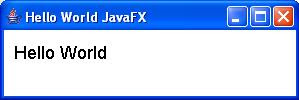
Hello World application
This is the typical “Hello World” application:


import javafx.ui.*;
Frame { title: "Hello World JavaFX"
width: 300
height: 100
content: Box {
content:
[Label {
text: "Hello World"
toolTipText: "Tool tip"
font: Font {
size: 18
}
border: EmptyBorder {
top: 10
left: 10
}
background: Color {
blue: 255
green: 255
red: 255
}
}]
}
visible: true
}
View the code online.

In order to run this application in NetBeans 5.5, you need to follow these steps:
1. Launch NetBeans 5.5.
2. From the main menu, go to File New Project.
3. In the New Project window, select the General category, select Java Application project, and click Next.
4. In the New Java Application window, type FXExample in the Project Name text field.
5. In the same window, use the Browse button to select the location of the project.
6. Uncheck the Set As Main Project and Create Main Class check boxes and click Finish.
7. Right-click on the FXExample Source Packages and select New - File/Folder.
8. In the New File window, select the Other category, select the JavaFX File file type, and click Next.
9. In the New JavaFX File window, type “HelloWorld” for the File Name, type “src” for the Folder, and click Finish.
10. Copy the code from Listing 1 and paste it in HelloWorld.fx.
11. Right-click FXExample project and select Properties.
12. In the Project Properties - FXExample, select the Run node from the Categories pane.
13. In the Arguments text field, type “Hello World” and click OK.
14. Right-click FXExample project and select the Run Project option.
If everything works, you should see the Hello World application running (see Figure A).
Figure A


To read the complete article click on the link: http://blogs.techrepublic.com.com/programming-and-development/?p=539&tag=nl.e138

Sunday, November 4, 2007

What is RMI (Remote Method Invocation)?

Remote Method Invocation (RMI)
Java Remote Method Invocation (Java RMI) enables the programmer to create distributed Java technology-based to Java technology-based applications, in which the methods of remote Java objects can be invoked from other Java virtual machines*, possibly on different hosts. RMI uses object serialization to marshal and unmarshal parameters and does not truncate types, supporting true object-oriented polymorphism.
Java RMI is included with Java SE and is available as a
separate download for Java ME.


An Overview of RMI Applications
RMI applications are often comprised of two separate programs: a server and a client. A typical server application creates some remote objects, makes references to them accessible, and waits for clients to invoke methods on these remote objects. A typical client application gets a remote reference to one or more remote objects in the server and then invokes methods on them. RMI provides the mechanism by which the server and the client communicate and pass information back and forth. Such an application is sometimes referred to as a distributed object application.
Distributed object applications need to
Locate remote objects: Applications can use one of two mechanisms to obtain references to remote objects. An application can register its remote objects with RMI's simple naming facility, the rmiregistry, or the application can pass and return remote object references as part of its normal operation.
Communicate with remote objects: Details of communication between remote objects are handled by RMI; to the programmer, remote communication looks like a standard Java method invocation.
Load class bytecodes for objects that are passed around: Because RMI allows a caller to pass objects to remote objects, RMI provides the necessary mechanisms for loading an object's code, as well as for transmitting its data.


The following illustration depicts an RMI distributed application that uses the registry to obtain a reference to a remote object. The server calls the registry to associate (or bind) a name with a remote object. The client looks up the remote object by its name in the server's registry and then invokes a method on it. The illustration also shows that the RMI system uses an existing Web server to load class bytecodes, from server to client and from client to server, for objects when needed.


Saturday, November 3, 2007

J2EE Architecture

J2EE Architecture
The following figure shows the major elements of the J2EE architecture:


J2EE Server
The J2EE server of the JavaTM 2 SDK, Enterprise Edition implements the J2EE architecture. The J2EE server provides the following services:


---Naming and Directory - allows programs to locate services and components through the JavaNaming and Directory InterfaceTM (JNDI) API
---Authentication - enforces security by requiring users to log in
---HTTP - enables Web browsers to access servlets and JavaServer PagesTM (JSP) files
----EJB - allows clients to invoke methods on enterprise beans


EJB Container
Enterprise bean instances run within an EJB container. The container controls the enterprise beans, and provides them with important system-level services. Since you don't have to develop these services yourself, you are free to concentrate on the business methods in the enterprise beans. The container provides the following services to enterprise beans:


**Transaction Management
**Security
**Remote Client Connectivity
**Life Cycle Management
**Database Connection Pooling


Transaction Management


When a client invokes a method in an enterprise bean, the container intervenes in order to manage the transaction. Because the container manages the transaction, you do not have to code transaction boundaries in the enterprise bean. The code required to control distributed transactions can be quite complex. Instead of writing and debugging complex code, you simply declare the enterprise bean's transactional properties in the deployment descriptor file. The container reads the file and handles the enterprise bean's transactions for you.


Security
The container permits only authorized clients to invoke an enterprise bean's methods. Each client belongs to a particular role, and each role is permitted to invoke certain methods. You declare the roles and the methods they may invoke in the enterprise bean's deployment descriptor. Because of this this declarative approach, you don't need to code routines that enforce security.


Remote Client Connectivity
The container manages the low-level communications between clients and enterprise beans. After an enterprise bean has been created, a client invokes methods on it as if it were in the same virtual machine.


Life Cycle Management
An enterprise bean passes through several states during its lifetime. The container creates the enterprise bean, moves it between a pool of available instances and the active state, and finally, removes it. Although the client calls methods to create and remove an an enterprise bean, the container performs these tasks behind the scenes.


Database Connection Pooling
A database connection is a costly resource. Obtaining a database connection is time-consuming and the number of connnections may be limited. To alleviate these problems, the container manages a pool of database connections. An enterprise bean can quickly obtain a connection from the pool. After the bean releases the connection, it may be re-used by another bean.


Web Container
JSP files and and servlets reside in the Web container. For more information on developing Web components, see the JavaTM 2 Technologies for the Enterprise Web page.


Enterprise Beans
Enterprise beans are server components written in the Java programming language. Enterprise beans contain the business logic for your application. For example, a checkbook client might invoke the debit and credit methods of an account enterprise bean.
There are two types of enterprise beans: session beans and entity beans.

Friday, November 2, 2007

What is CORBA?

What is CORBA?
CORBA, or Common Object Request Broker Architecture, is a standard architecture for distributed object systems. It allows a distributed, heterogeneous collection of objects to interoperate.
The OMG
The Object Management Group (OMG) is responsible for defining CORBA. The OMG comprises over 700 companies and organizations, including almost all the major vendors and developers of distributed object technology, including platform, database, and application vendors as well as software tool and corporate developers.
CORBA Architecture
CORBA defines an architecture for distributed objects. The basic CORBA paradigm is that of a request for services of a distributed object. Everything else defined by the OMG is in terms of this basic paradigm.
The services that an object provides are given by its interface. Interfaces are defined in OMG's Interface Definition Language (IDL). Distributed objects are identified by object references, which are typed by IDL interfaces.
The figure below graphically depicts a request. A client holds an object reference to a distributed object. The object reference is typed by an interface. In the figure below the object reference is typed by the Rabbit interface. The Object Request Broker, or ORB, delivers the request to the object and returns any results to the client. In the figure, a jump request returns an object reference typed by the AnotherObject interface.


The ORB
The ORB is the distributed service that implements the request to the remote object. It locates the remote object on the network, communicates the request to the object, waits for the results and when available communicates those results back to the client.


The ORB implements location transparency. Exactly the same request mechanism is used by the client and the CORBA object regardless of where the object is located. It might be in the same process with the client, down the hall or across the planet. The client cannot tell the difference.


The ORB implements programming language independence for the request. The client issuing the request can be written in a different programming language from the implementation of the CORBA object. The ORB does the necessary translation between programming languages. Language bindings are defined for all popular programming languages.


CORBA as a Standard for Distributed Objects
One of the goals of the CORBA specification is that clients and object implementations are portable. The CORBA specification defines an application programmer's interface (API) for clients of a distributed object as well as an API for the implementation of a CORBA object. This means that code written for one vendor's CORBA product could, with a minimum of effort, be rewritten to work with a different vendor's product. However, the reality of CORBA products on the market today is that CORBA clients are portable but object implementations need some rework to port from one CORBA product to another.
CORBA 2.0 added interoperability as a goal in the specification. In particular, CORBA 2.0 defines a network protocol, called IIOP (Internet Inter-ORB Protocol), that allows clients using a CORBA product from any vendor to communicate with objects using a CORBA product from any other vendor. IIOP works across the Internet, or more precisely, across any TCP/IP implementation.


Interoperability is more important in a distributed system than portability. IIOP is used in other systems that do not even attempt to provide the CORBA API. In particular, IIOP is used as the transport protocol for a version of Java RMI (so called "RMI over IIOP"). Since EJB is defined in terms of RMI, it too can use IIOP. Various application servers available on the market use IIOP but do not expose the entire CORBA API. Because they all use IIOP, programs written to these different API's can interoperate with each other and with programs written to the CORBA API.


CORBA Services
Another important part of the CORBA standard is the definition of a set of distributed services to support the integration and interoperation of distributed objects. As depicted in the graphic below, the services, known as CORBA Services or COS, are defined on top of the ORB. That is, they are defined as standard CORBA objects with IDL interfaces, sometimes referred to as "Object Services."


There are several CORBA services. The popular ones are described in detail in another module of this course. Below is a brief description of each:


Service Description
Object life cycle Defines how CORBA objects are created, removed, moved, and copied
Naming Defines how CORBA objects can have friendly symbolic names
Events Decouples the communication between distributed objects
Relationships Provides arbitrary typed n-ary relationships between CORBA objects
Externalization Coordinates the transformation of CORBA objects to and from external media.

Transactions Coordinates atomic access to CORBA objects
Concurrency Control Provides a locking service for CORBA objects in order to ensure serializable access

Property Supports the association of name-value pairs with CORBA objects
Trader Supports the finding of CORBA objects based on properties describing the service offered by the object
Query Supports queries on objects

CORBA Products
CORBA is a specification; it is a guide for implementing products. Several vendors provide CORBA products for various programming languages. The CORBA products that support the Java programming language include:

ORB and its Description
The Java 2 ORB : The Java 2 ORB comes with Sun's Java 2 SDK. It is missing several features.
VisiBroker for Java A popular Java ORB from Inprise Corporation. VisiBroker is also embedded in other products. For example, it is the ORB that is embedded in the Netscape Communicator browser.
OrbixWeb:A popular Java ORB from Iona Technologies.
WebSphere: A popular application server with an ORB from IBM.
Netscape Communicator: Netscape browsers have a version of VisiBroker embedded in them. Applets can issue request on CORBA objects without downloading ORB classes into the browser. They are already there.
Various free or shareware ORBs: CORBA implementations for various languages are available for download on the web from various sources.

Tuesday, October 30, 2007

J2EE FAQs or Interview Questions

J2EE FAQs or Interview Questions.

1.What is J2EE?
J2EE is an environment for developing and deploying enterprise applications. The J2EE platform consists of a set of services, application programming interfaces (APIs), and protocols that provide the functionality for developing multi tiered, and web-based applications.


2. What is the J2EE module?
A J2EE module consists of one or more J2EE components for the same container type and one component deployment descriptor of that type.

3.What are the components of J2EE application?
A J2EE component is a self-contained functional software unit that is assembled into a J2EE application with its related classes and files and communicates with other components. The J2EE specification defines the following J2EE components:
o Application clients and applets are client components.
o Java Servlets and Java Server Pages TM (JSPTM) technology components are web components.
o Enterprise JavaBeansTM (EJBTM) components (enterprise beans) are business components.
o Resource adapter components provided by EIS and tool vendors.

4. What are the four types of J2EE modules?
1. Application client module
2. Web module
3. Enterprise JavaBeans module
4. Resource adapter module
5. What does application client module contain?

The application client module contains:
o class files,
o an application client deployment descriptor.
Application client modules are packaged as JAR files with a .jar extension.

6. What does Enterprise JavaBeans module contain?
The Enterprise JavaBeans module contains:
o class files for enterprise beans
o An EJB deployment descriptor.
EJB modules are packaged as JAR files with a .jar extension
.

7.What does resource adapt module contain?
The resource adapt module contains:
o all Java interfaces,
o classes,
o native libraries,
o other documentation,
o A resource adapter deployment descriptor.
Resource adapter modules are packages as JAR files with a .rar (Resource adapter Archive) extension.

8.How many development roles are involved in J2EE application?
There are at least 5 roles involved:

1. Enterprise Bean Developer
* Writes and compiles the source code
* Specifies the deployment descriptor
* Bundles the .class files and deployment descriptor into an EJB JAR file
2. Web Component Developer
* Writes and compiles Servlets source code
* Writes JSP and HTML files
* Specifies the deployment descriptor for the Web component
* Bundles the .class, .jsp, .html, and deployment descriptor files in the WAR file
3. J2EE Application Client Developer
* Writes and compiles the source code
* Specifies the deployment descriptor for the client
* Bundles the .class files and deployment descriptor into the JAR file
4. Application Assembler : The application assembler is the company or person who receives application component JAR files from component providers and assembles them into a J2EE application EAR file. The assembler or deployer can edit the deployment descriptor directly or use tools that correctly add XML tags according to interactive selections. A software developer performs the following tasks to deliver an EAR file containing the J2EE application:
* Assembles EJB JAR and WAR files created in the previous phases into a J2EE application (EAR) file
* Specifies the deployment descriptor for the J2EE application
* Verifies that the contents of the EAR file are well formed and comply with the J2EE specification
5. Application Deployer and Administrator
* Configures and deploys the J2EE application
* Resolves external dependencies
* Specifies security settings & attributes
* Assigns transaction attributes and sets transaction controls
* Specifies connections to databases
* Deploys or installs the J2EE application EAR file into the J2EE server
* Administers the computing and networking infrastructure where J2EE applications run
* Oversees the runtime environment
But a developer role depends on the job assignment. For a small company, one developer may take these 5 roles altogether.

9. What is difference between J2EE 1.3 and J2EE 1.4?
J2EE 1.4 is an enhancement version of J2EE 1.3. It is the most complete Web services platform ever.
J2EE 1.4 includes:
o Java API for XML-Based RPC (JAX-RPC 1.1)
o SOAP with Attachments API for Java (SAAJ),
o Web Services for J2EE(JSR 921)
o J2EE Management Model(1.0)
o J2EE Deployment API(1.1)
o Java Management Extensions (JMX),
o Java Authorization Contract for Containers(JavaACC)
o Java API for XML Registries (JAXR)
o Servlet 2.4
o JSP 2.0
o EJB 2.1
o JMS 1.1
o 2EE Connector 1.5

The J2EE 1.4 features complete Web services support through the new JAX-RPC 1.1 API, which supports service endpoints based on Servlets and enterprise beans. JAX-RPC 1.1 provides interoperability with Web services based on the WSDL and SOAP protocols.

The J2EE 1.4 platform also supports the Web Services for J2EE specification (JSR 921), which defines deployment requirements for Web services and utilizes the JAX-RPC programming model.

In addition to numerous Web services APIs, J2EE 1.4 platform also features support for the WS-I Basic Profile 1.0. This means that in addition to platform independence and complete Web services support, J2EE 1.4 offers platform Web services interoperability.

The J2EE 1.4 platform also introduces the J2EE Management 1.0 API, which defines the information model for J2EE management, including the standard Management EJB (MEJB). The J2EE Management 1.0 API uses the Java Management Extensions API (JMX).

The J2EE 1.4 platform also introduces the J2EE Deployment 1.1 API, which provides a standard API for deployment of J2EE applications.

The J2EE 1.4 platform includes security enhancements via the introduction of the Java Authorization Contract for Containers (JavaACC). The JavaACC API improves security by standardizing how authentication mechanisms are integrated into J2EE containers.

The J2EE platform now makes it easier to develop web front ends with enhancements to Java Servlet and JavaServer Pages (JSP) technologies. Servlets now support request listeners and enhanced filters. JSP technology has simplified the page and extension development models with the introduction of a simple expression language, tag files, and a simpler tag extension API, among other features. This makes it easier than ever for developers to build JSP-enabled pages, especially those who are familiar with scripting languages.

Other enhancements to the J2EE platform include the J2EE Connector Architecture, which provides incoming resource adapter and Java Message Service (JMS) plug ability. New features in Enterprise JavaBeans (EJB) technology include Web service endpoints, a timer service, and enhancements to EJB QL and message-driven beans.

The J2EE 1.4 platform also includes enhancements to deployment descriptors. They are now defined using XML Schema which can also be used by developers to validate their XML structures.

Note: The above information comes from SUN released notes.

10. Is J2EE application only a web-based?
NO. A J2EE application can be web-based or non-web-based. If an application client executes on the client machine, it is a non-web-based J2EE application. The J2EE application can provide a way for users to handle tasks such as J2EE system or application administration. It typically has a graphical user interface created from Swing or AWT APIs, or a command-line interface. When user request, it can open an HTTP connection to establish communication with a Servlet running in the web tier.
Saturday, October 27, 2007

EJB Tutorial.

What Is an EJB?

In a typical J2EE application, Enterprise JavaBeans (EJBs) contain the application's business logic and live business data. Although it is possible to use standard Java objects to contain your business logic and business data, using EJBs addresses many of the issues you would find by using simple Java objects, such as scalability, lifecycle management, and state management.

Beans, Clients, Containers, and Servers

An EJB is essentially a managed component that is created, controlled, and destroyed by the J2EE container in which it lives. This control allows the container to control the number of EJBs currently in existence and the resources they are using, such as memory and database connections. Each container will maintain a pool of EJB instances that are ready to be assigned to a client. When a client no longer needs an EJB, the EJB instance will be returned to the pool and all of its resources will be released. At times of heavy load, even EJB instances that are still in use by clients will be returned to the pool so they can service other clients. When the original client makes another request of its EJB, the container will reconstitute the original EJB instance to service the request. This pooling and recycling of EJB instances means that a few EJB instances, and the resources they use, can be shared between many clients. This maximizes the scalability of the EJB-based application.

The client that uses the EJB instance does not need to know about all of this work by the container. As far as the client is concerned, it is talking to a remote component that supports defined business methods. How those methods are implemented and any magic performed by the container, such as just-in-time instantiation of that specific component instance, are entirely transparent to the client part of the application.

The EJB benefits from certain services provided by the container, such as automatic security, automatic transactions, lifecycle management, and so on. To do this, the EJB must conform to certain rules and implement an appropriate interface that allows the container to manage the component. The EJB is packaged with configuration information that indicates the component's requirements, such as transaction and security requirements. The container will then use this information to perform authentication and control transactions on behalf of the component—the component does not have to contain code to perform such tasks.

The primary purpose of the container is to control and provide services for the EJBs it contains. When it needs to use some underlying functionality, such as creating a transaction on behalf of a bean, it uses the facilities of the underlying EJB server. The EJB server is the base set of services on top of which the container runs. Different types of EJB will run in different containers, but many different EJB containers can run on a single EJB server. EJB servers are generally delivered as part of a J2EE-compliant application server (examples include BEA WebLogic and IBM WebSphere). You will install and run the application server, which will provide the underlying services required of an EJB server and will host EJB containers.

The EJB Landscape


As you have seen, the J2EE Blueprints (
http://java.sun.com/blueprints/enterprise/index.html) define a target architecture for a typical J2EE-based application. In this architecture, EJBs live in the middle tier and are used by other application components that live in the presentation tier. Although it is possible that both of these logical tiers will reside on the same computer, it is most likely that they will reside on different machines. This means that an EJB will usually have to be made available to remote clients.

To offer services to remote clients, EJBs will export their services as RMI remote interfaces. RMI allows you to define distributed interfaces in Java. There are certain caveats on doing this, not only at the implementation level (such as declaring that RemoteExceptions may be thrown when calling a method on an EJB) but also at the design level. Designing remote interfaces is a skill in itself, which will be explored as you progress through topics in this book, such as EJBs and J2EE Patterns.

Because they must use an RMI-based interface to access the functionality of the EJB, the clients of an EJB must have some programming functionality. This means that they are typically either "thick" clients that provide a GUI interface or Web-server components that deliver HTML interfaces to "thin" clients. The different types of client are explored in more detail shortly.

In the other direction, EJBs themselves will make use of data sources, such as databases and mainframe systems, to perform the required business logic. Access to such data and services can be through a JDBC database connection, a J2EE Connector, another EJB, or a dedicated server or class of some form.

Discovering EJBs

While it is quite easy to draw pictures of a 3-tier system containing boxes labelled "EJB," it is important to identify what application functionality should go into an EJB.

At the start of application development, regardless of the precise development process used (Rational Unified Process (RUP), eXtreme Programming (XP), and so on), there is generally some analysis that delivers a Unified Modelling Language (UML) domain model (this identifies the main elements of the business problem to be solved). This can then form the basis of a solution model where the business concepts are mapped into appropriate design-level artefacts, such as components. This is where EJBs come into the design.

The UML model will consist of a set of classes and packages that represent single or grouped business concepts. A class or package can be implemented as an EJB. Generally, only larger individual classes will become EJBs in themselves, because EJBs are intended to be fairly coarse-grained components that incorporate a reasonably large amount of functionality and/or data.

There are generally two types of functionality discovered during analysis—data manipulation and business process flow. The application model will usually contain data-based classes such as Customer or Product. These classes will be manipulated by other classes or roles that represent business processes, such as Purchaser or CustomerManager. There are different types of EJB that can be applied to these different requirements.

Types of EJB

There are three different types of EJB that are suited to different purposes:

· Session EJB—A Session EJB is useful for mapping business process flow (or equivalent application concepts). There are two sub-types of Session EJB — stateless and stateful— that are discussed in more detail on Day 5. Session EJBs commonly represent "pure" functionality that is created as it is needed.

·Entity EJB—An Entity EJB maps a combination of data (or equivalent application concept) and associated functionality. Entity EJBs are usually based on an underlying data store and will be created based on that data within it.

·Message-driven EJB—A Message-driven EJB is very similar in concept to a Session EJB, but is only activated when an asynchronous message arrives.
As an application designer, you should choose the most appropriate type of EJB based on the task to be accomplished.

Common Uses of EJBs

So, given all of this, where would you commonly encounter EJBs and in what roles? Well, the following are some examples:

· In a Web-centric application, the EJBs will provide the business logic that sits behind the Web-oriented components, such as servlets and JSPs. If a Web-oriented application requires a high level of scalability or maintainability, use of EJBs can help to deliver this.

·Thick client applications, such as Swing applications, will use EJBs in a similar way to Web-centric applications. To share business logic in a natural way between different types of client applications, EJBs can be used to house that business logic.

·Business-to-business (B2B) e-commerce applications can also take advantage of EJBs. Because B2B e-commerce frequently revolves around the integration of business processes, EJBs provide an ideal place to house the business process logic. They can also provide a link between the Web technologies frequently used to deliver B2B and the business systems behind.

· Enterprise Application Integration (EAI) applications can incorporate EJBs to house processing and mapping between different applications. Again, this is an encapsulation of the business logic that is needed when transferring data between applications (in this case, in-house applications).

These are all high-level views on how EJBs are applied. There are various other EJB-specific patterns and idioms that can be applied when implementing EJB-based solutions. Given this context, common types of EJB client include the following:

· A servlet or JSP that provides an HTML-based interface for a browser client
· Another EJB that can delegate certain of its own tasks or can work in combination with other EJBs to achieve its own goals
· A Java/Swing application that provides a front-end for the business processes encapsulated in the EJB
· A CORBA application that takes advantage of the EJB's business logic
· An applet that takes advantage of the business logic in a remote EJB so that this business logic does not need to be downloaded to the client

These are common ways that EJBs are applied. What benefits does the use of EJBs give to you as a developer?

Go to page: 1
2 Next
Next article:
Introduction to EJBs: Part 2